By NFC Visiting Cards Editorial Team | Published | Updated | Buying guides
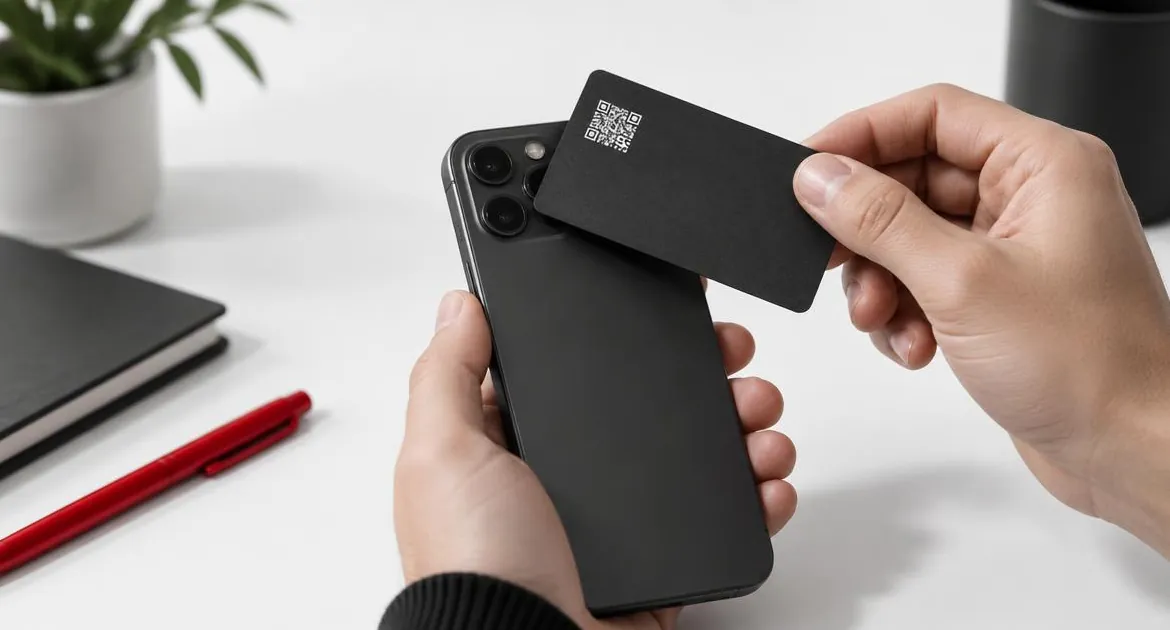
An NFC visiting card looks like an ordinary card. The difference is inside it and behind it. Inside is a small chip. Behind it is an online profile with your details, which the chip opens on the other person's phone.
This guide is the starting point for our series on NFC visiting cards. It explains how the card works, what to choose and how to use it. Each section links to a more detailed guide where one exists.
What is inside an NFC visiting card
NFC stands for near-field communication. It is a short-range wireless standard, the same family of technology used for contactless payment and travel cards. It only works over a few centimetres, which is why the phone has to come close to the card.
An NFC visiting card has three parts:
- The chip. A tiny passive tag. It has no battery and no moving parts. It wakes up for a moment when a phone's reader comes close and gives it power.
- The antenna. A thin coil around the chip that receives that power and sends the link back.
- The card body. The part you see and hold: PVC, metal or bamboo wood. It protects the chip and carries your printed details and a QR code.
The chip does not hold your contact details. It holds one short record, normally a web link. That link points to your profile page, where your name, role, phone number, email, website and social links live.
How a tap works, step by step
- You hold your card near the other person's phone.
- Their phone's NFC reader powers the chip for a fraction of a second.
- The chip sends back the link it stores.
- The phone shows a notification or opens the link straight away.
- Your profile opens in their browser, and they tap a button to save you as a contact.
Nobody needs to install anything. The phone uses its built-in NFC reader and its normal web browser. The whole exchange usually takes a second or two.
Because the card only holds a link, everything on the profile can change without touching the card. When you edit the profile, every card you have already handed out opens the new version.
Where the QR code fits in
Every card we sell also has a printed QR code. It opens the same profile as the chip. The QR code covers the cases where a tap is not possible:
- the other phone has no NFC reader, or it is switched off;
- the phone is an older model that does not read cards in the background;
- you want to share your profile on a screen, a slide or a sign.
Pointing a phone camera at the code opens the profile, just as a tap does. Having both on one card means you can share your details with phones that read NFC and with other camera phones.
Our guide to which phones can read an NFC visiting card explains the iPhone and Android details and what to do when a tap does nothing.
The profile behind the card
The profile is the part people actually see. It opens in the browser and shows the details you choose. On our cards it can include:
- your name, role, company and photo or logo;
- phone, email, website and address;
- social profiles and any other links, such as a portfolio or booking page;
- a button that saves your contact straight into the other person's phone.
You can edit the profile at any time from your account. A new job title, phone number or website is a quick edit, not a reprint.
The profile plan you choose decides the features. The Brand Presence plan covers your branded profile, with sections such as social links, a gallery, documents, visibility controls and password protection. The Business Add-ons plan adds CRM, lead capture and bookings. Both are paid once, with no monthly fee for the card.
Setting up your card
Ordering and setting up a card takes a few steps:
- Choose a material, PVC, metal or wood, and a colour or finish.
- Pick your profile plan and any extras, such as your logo or removing our branding.
- Enter the name and role to show on the card, and upload your logo if you added one.
- Add the card to your basket and pay once at checkout.
- We print the card and dispatch it from the UK by Royal Mail with tracking.
- Set up your online profile, then tap the card on your own phone to check it opens.
Do the last step before your first meeting, so you know exactly what people see and where to hold the card. Our guide to setting up your NFC visiting card walks through each step, from delivery to the first tap.
Choosing a material
The material changes how the card looks and feels. It does not change what the card does. Every material has the same chip, the same printed QR code and the same profile.
| Material | Finishes | Weight and feel | Often chosen for |
|---|---|---|---|
| PVC | Black, Green, Brown, Blue | Lightest option, standard card thickness | Everyday use, team orders, lowest price |
| Metal | Black & Gold, Black & Silver | Heaviest option, solid and rigid | Executives and client-facing roles |
| Bamboo wood | White Bamboo, Original Bamboo | Light and warm, natural grain | Brands that want a natural look |
The full comparison, with the price of each material in your store, is in our guide to metal vs PVC vs wood NFC visiting cards. Each material also has its own guide: PVC, bamboo wood and metal.
Designing your card
A good NFC card is simple. The chip does the sharing, so the printed side only needs to identify you and show people what to do.
- Name and role. You enter the name to show on the card, and a role if you want one. Keep the role short.
- Your logo. Adding your logo is a paid option. Use a clear version of the logo that reads well at small size.
- Our branding. Removing our branding from the card is a separate paid option.
- The QR code. It is printed on every card. Leave it visible and do not crowd it with other elements.
- A tap prompt. Many people have never used an NFC card. Saying "tap here" while you hold it out works better than any printed instruction.
The profile is where the detail goes. Put the most useful information first: your name, role, phone and email, with the save-contact button easy to find. Add links in the order people need them.
Using your card day to day
A card only helps if you use it at the right moment. A few habits make the difference:
- Offer the tap, then talk. Hold the card out and say "tap here to save my details". Most people follow a simple prompt.
- Know where to tap. On an iPhone the reader sits near the top edge. On many Android phones it sits in the middle of the back.
- Switch to the QR code quickly. If nothing happens after a couple of seconds, point to the code instead of trying again and again.
- Keep the profile current. Update your details as soon as they change. The next tap shows the new version.
- Carry it where you can reach it. A phone case slot or the front of a wallet works better than the bottom of a bag.
- Use one card for everything. One profile can hold your website, booking link and socials, so you do not need a card for each purpose.
One card can be tapped by as many people as you meet, and it stays with you. That makes it a good fit for events, client meetings and front desks, where paper cards tend to run out. Our guide to how to use an NFC visiting card covers what to say and meeting etiquette. For your line of work, see our guides for consultants and freelancers, photographers and videographers and personal trainers and coaches.
NFC or QR code?
You do not have to choose. Every card has both. They suit slightly different moments, though, so it helps to know the difference.
| NFC tap | QR code | |
|---|---|---|
| How it opens | Hold the phone near the card | Point the camera at the code |
| Phones | iPhone XR or later, and Android phones with NFC switched on | Other phones with a camera |
| Distance | A few centimetres | Arm's length, or on a screen |
| Speed | Usually a second or two | A second or two once the camera focuses |
| Works on a slide or sign | No | Yes |
In person, the tap is quick and feels natural. On a screen, a printed sign or a phone that does not read NFC, the QR code takes over. Both open the same profile, so the result is the same.
When an NFC card is not the right fit
An NFC card is not for everyone. It may not be worth it if:
- you rarely meet people in person and share your details mostly by email;
- you need to hand out hundreds of cards that people keep, such as at a large fair where nobody stops to tap;
- your industry expects a printed card with a lot of text on it.
In those cases a paper card may still do the job. You can also use both: an NFC card for meetings and conversations, and a few paper cards for the rare person who wants something to file. Our guide to NFC vs paper visiting cards compares the two. If you only want a tap to open one account, see NFC visiting cards vs social media NFC cards.
Is it safe to hand out?
The chip stores a link, not your personal data. Anyone who taps it sees the same public profile they would see by typing the address. You decide what that profile shows and can change it at any time. Our guide to whether NFC visiting cards are secure explains what the chip holds, who can read it and how to keep your profile private.
Paper cards compared with NFC cards
| Paper card | NFC visiting card | |
|---|---|---|
| Sharing | Hand it over and hope it is kept | Tap or scan, then save to the phone |
| Changing details | Reprint the batch | Edit the online profile |
| Links and portfolio | Not possible | Website, socials, portfolio and booking links |
| How many you need | One per person you meet | One card, tapped again and again |
| What the other person needs | Nothing | A phone with NFC or a camera |
What to check before you buy
- Can you edit the profile yourself? You should be able to change details at any time without paying again.
- Is there a monthly fee? Ours is a one-time payment for the card and profile plan.
- Is there a QR code on every card? It is the backup for phones that do not read NFC.
- Which material suits you? PVC, metal or bamboo wood.
- What happens if something goes wrong? Our physical cards carry a 12-month warranty for manufacturing faults. Personalised cards are made to order, so they cannot be returned for a change of mind.
- Where does it ship from? We dispatch from the UK with tracking. Any delivery charge is shown at checkout before you pay.
If you are thinking of programming a blank card yourself, our guide to DIY NFC visiting cards vs a ready-made one compares the two. You can compare the materials and plans on our NFC visiting card page, where each option shows its price for your store.
Guides in this series
Each guide below answers one question in more detail. New guides in the series are added here as they are published.
Buying guides
- NFC Visiting Card Price: What You Actually Pay
What an NFC visiting card costs and why: the card and profile plan, the material, logo and branding options, delivery and duties, all paid once.
- Before You Buy an NFC Visiting Card: a 10-Point Checklist
Ten things to confirm before you buy an NFC visiting card, from the QR backup and the material to spelling, delivery, returns and testing on arrival.
- NFC Visiting Card or Social Media NFC Card? Which to Buy
A full-profile NFC visiting card or a single-link Instagram, TikTok, LinkedIn or WhatsApp card? What each one opens, what it costs and who needs which.
- DIY NFC Visiting Card vs a Ready-Made One
Making your own NFC visiting card from a blank tag and an app, or buying a printed card with a hosted profile: the effort, the look, the QR code and the risks.
- NFC Visiting Card vs Paper Visiting Card: Which Makes Sense?
Paper cards or one NFC card? What happens when your details change, what each one does at a handover, when to carry both and how the costs compare.
Materials & design
- Metal vs PVC vs Wood NFC Visiting Cards: How to Choose
PVC, metal and bamboo wood NFC visiting cards share the same chip, QR code and profile. This guide compares finishes, weight, feel and price so you can choose.
- Custom NFC Visiting Card Design: Logo, Layout and Proofing
How to design a custom NFC visiting card: the logo upload, what sits on each side, contrast on each material, the remove-branding option and checking the details.
- Metal NFC Visiting Cards: How They Work and When They Are Worth It
How a metal NFC visiting card works, why it is built differently from plastic, where to tap it, what it costs over PVC and who it suits.
- Wooden NFC Visiting Cards: Bamboo Look, Care and Price
What a wooden NFC visiting card is like to own: the two bamboo finishes, how it looks and feels, how to look after it, what it costs and who it suits.
- PVC NFC Visiting Cards: the Everyday Choice
Why PVC is the everyday NFC visiting card: the four colours, how it feels, which logo colours suit each one, who it is for and what it costs in each store.
Using your card
- Which Phones Can Read an NFC Visiting Card?
Which iPhones and Android phones read an NFC visiting card with a tap, where to hold the card, what to try when a tap fails and when the QR code is quicker.
- Are NFC Visiting Cards Secure? What the Chip Stores
An NFC visiting card stores a web link, not your personal data. What the chip holds, who can read it, what write-locking does and how to control your profile.
- NFC vs QR Code Visiting Card: Tap or Scan?
Tap or scan? How NFC and QR codes compare on a visiting card for speed, phones, light, distance and screens, and why every card we sell carries both.
- How to Use an NFC Visiting Card (Without the Awkward Moment)
What to say when you hand over an NFC visiting card, where to hold it, when to offer the QR code and how to make sure the other person saves your contact.
- Setting Up Your NFC Visiting Card: From Delivery to First Tap
From the moment your card arrives to the first tap: setting up your online profile, adding details and links, testing the tap and the QR code, and changing things later.
By profession
- NFC Visiting Cards for Consultants and Freelancers
What consultants and freelancers can put on an NFC visiting card profile, from a booking link and case studies to LinkedIn, and which material suits client meetings.
- NFC Visiting Cards for Photographers and Videographers
Building a portfolio-first NFC visiting card profile for photo and video work: galleries, showreel links, enquiries at weddings and events, and a card that matches your brand.
- NFC Visiting Cards for Personal Trainers and Coaches
Sharing your details on the gym floor with an NFC visiting card: class timetable, booking links and WhatsApp on one profile, and why PVC suits a gym bag.
Frequently asked questions
Do NFC visiting cards need a battery?
No. The chip is passive. It takes power from the phone's NFC reader during the tap, so there is nothing to charge.
Is my personal data stored on the card?
No. The chip stores a link to your profile. Your details are on the profile, which you can edit or hide at any time.
Does the other person need an app?
No. Phones that read NFC open the profile in their browser, and other camera phones scan the printed QR code. Nobody installs anything.
What happens when my details change?
You edit your profile online. Every card you have already handed out opens the updated profile, so there is nothing to reprint.
Is there a subscription?
No. You pay once for the card and the profile plan you choose. There is no monthly fee to keep the card working.
Can I order cards for a team?
Yes. Each card links to its own profile, so every person on the team shares their own details.
What if a card has a fault?
Physical cards carry a 12-month warranty that covers manufacturing faults. Personalised cards are made to order and are not returnable for a change of mind.